🌟 What is Software?
Software is a set of programs that tells the computer what to do.
Without software, a computer is just a machine.
👉 Think: Hardware = Body, Software = Brain
🔷 1. SYSTEM SOFTWARE (The Boss 👑)
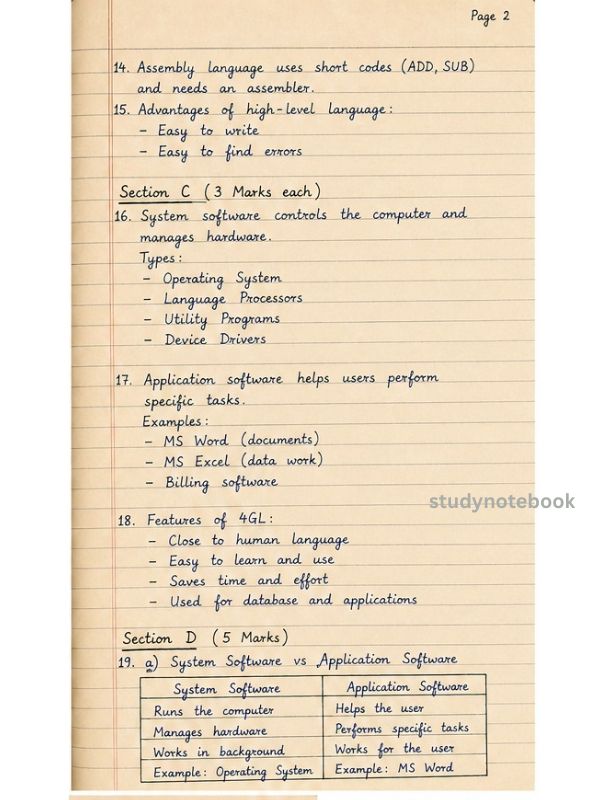
System software controls the computer and helps everything run smoothly. It also provides a platform for application software.
🖥️ a) Operating System (OS)
The OS is like a manager between the user and the computer.
It controls memory, files, and all operations.
👉 Examples: Windows, Linux, macOS
👉 Memory Trick: OS = Overall System control
🔤 b) Language Processors
These convert programming language into machine language.
- Assembler → Converts assembly language
- Compiler → Converts the whole program at once
- Interpreter → Converts line by line
👉 Easy Trick:
A → Assembly | C → Complete | I → Individual lines
🛠️ c) Utility Programs
These help in maintaining the computer.
- Antivirus → protects
- Backup → saves a data copy
- Compression → reduces size
- Disk Defragmentation → organizes data
👉 Think: Utilities = Computer Caretaker
🔌 d) Device Drivers
Drivers help the computer communicate with devices.
👉 Examples: Printer, Keyboard, Display drivers
👉 Easy Trick: Driver = Helps devices “drive” into the computer
🔶 2. APPLICATION SOFTWARE (For Users 👩💻)
Application software is used to perform specific tasks.
📄 a) General Purpose Software
Used in daily life.
- MS Word → writing
- MS Excel → calculations
- PowerPoint → presentations
- MS Access → database
👉 Think: Daily Use Apps
🏢 b) Special Purpose Software
Used for specific business tasks.
- Billing software → bills
- Payroll → salaries
- Reservation → bookings
- Inventory → stock
👉 Think: Office Work Software
🎯 c) Customised Software
Made specially for a user or organization.
- Banking software
- Hospital system
- School management system
👉 Think: Made-to-order software
🧠 QUICK MEMORY
👉 System Software = Controls computer
👉 Application Software = Used by user
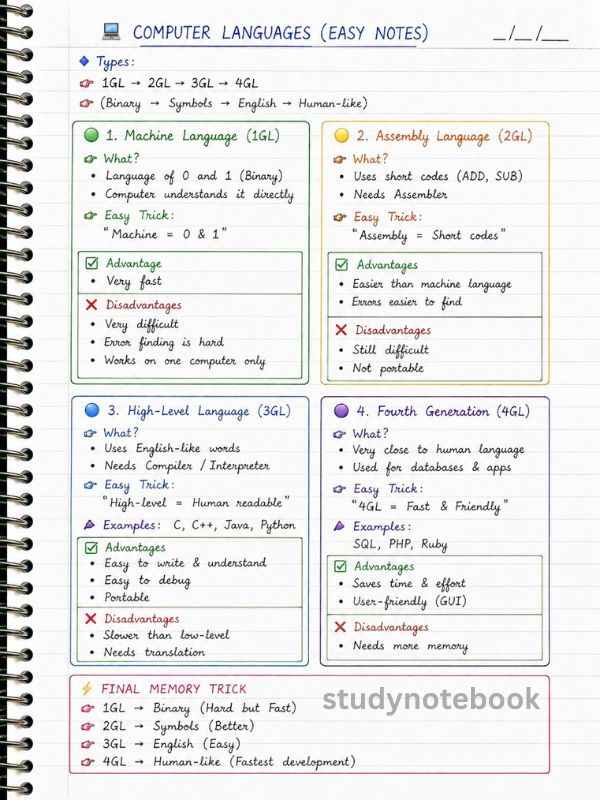
💡 COMPUTER LANGUAGES – EASY NOTES
🌈 Types of Languages
1GL → 2GL → 3GL → 4GL
(Binary → Symbols → English → Human-like)
🔴 1GL – Machine Language
- Uses 0 and 1
- A computer understands directly
👉 Very fast but very difficult
👉 Trick: Machine = 0 & 1
🟠 2GL – Assembly Language
- Uses short codes (ADD, SUB)
- Needs assembler
👉 Easier than 1GL but still difficult
👉 Trick: Assembly = Short codes
🔵 3GL – High-Level Language
- Uses English-like words
- Easy to write and understand
👉 Examples: C, C++, Java, Python
👉 Trick: High-level = Human readable
🟢 4GL – Fourth Generation
- Very close to human language
- Used in apps and databases
👉 Examples: SQL, PHP
👉 Trick: 4GL = Fast & Friendly
⚡
👉 1GL → Binary (Hard but Fast)
👉 2GL → Codes (Better)
👉 3GL → English (Easy)
👉 4GL → Human-like (Easiest)